Venice Web Design

Table of Contents

Leave a Comment

Your email address will not be published. Required fields are marked *

Small Business Website Cybersecurity Basics for Owners

Protect your business from common online threats with clear, practical cybersecurity steps for small business websites.

If your website drives leads, security needs your attention.

Many small business owners assume attackers ignore them. Data shows the opposite.

Most attacks run on automated scans. Hackers target weak websites, not large brands.
Here are the basics you need to cover.

Keep Your Website Updated

Outdated plugins, themes, and website platforms create a major website security risk for small businesses.

Cyber attackers scan for known vulnerabilities in outdated software. Once identified, they gain access fast and exploit weak points.

Update your CMS, plugins, and themes on a consistent schedule to fix security issues. Remove unused or inactive plugins and themes to reduce exposure. Use update alerts or monitoring tools to stay informed on new patches.

Regular website updates close security gaps, protect your data, and support stronger search engine rankings.
Use Strong Passwords and Multi-Factor Authentication

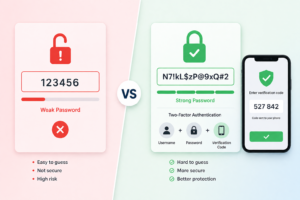
Weak passwords increase the risk of unauthorized access and data breaches on your website. Attackers use automated tools to guess or crack simple login credentials.

Use long, unique passwords for every website account to reduce risk. Store passwords in a secure password manager to avoid reuse across platforms. Enable multi-factor authentication on all critical logins, including your CMS, hosting account, and admin access.

Multi-factor authentication strengthens website security by adding a second verification step. Even if a password is exposed, attackers cannot access your system without the additional authentication layer.

Set Up Regular Website Backups

Website backups support fast recovery after cyber attacks, crashes, or data loss. Without a backup system, downtime increases and recovery costs rise.

Run website backups daily or weekly based on how often your content changes. Store backups in a secure, separate location such as cloud storage to prevent loss during an attack. Test your backups to confirm your data restores correctly when needed.

Regular backups protect your website, reduce risk, and help maintain consistent performance and search visibility.

Watch for Phishing Attempts

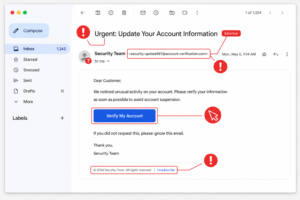
Many website security breaches start with phishing emails. Attackers use fake messages to steal login credentials or install malware on your system.

Watch for emails that request login details or sensitive information. Be cautious with unexpected attachments from unknown sources. Avoid clicking links from unfamiliar or suspicious senders.

Train your team to recognize phishing attempts and report them early. A single mistake leads to unauthorized access, data loss, and website security issues.

Scan for Malware

Malware affects website performance, search rankings, and customer data security. Infected websites often lose traffic, visibility, and user trust.

Run regular website security scans to detect malware early. Monitor file changes to identify unauthorized edits. Track suspicious activity across your website to catch threats before they spread.

Early detection limits damage, protects your data, and supports stable SEO performance.

Have a Recovery Plan

Even with strong cybersecurity measures, website issues and attacks still occur. A clear recovery plan supports faster response and minimizes disruption.

Know how to restore your website from backups to recover data quickly. Keep a reliable technical support contact for urgent issues. Document your recovery steps so your team follows a clear process during an incident.

Fast action limits downtime, protects leads, and helps maintain search rankings.

What to Do Next

  • Start with a quick review of your current website setup
  • Update your website, plugins, and themes
  • Review user access and remove unnecessary accounts
  • Turn on multi-factor authentication for all critical logins
  • Set up or confirm your website backup system

These steps take little time and reduce common website security risks.

If your website is not secure, your leads, data, and search performance are at risk.

Final Thoughts

Website security is not optional for small businesses that rely on online leads. Weak points such as outdated software, poor password practices, and lack of monitoring create easy entry for cyber attacks.

By keeping your website updated, using strong passwords with multi-factor authentication, setting up backups, and monitoring for threats, you reduce risk and protect your business operations. A clear recovery plan supports fast action when issues occur.

These steps improve website security, protect your data, and support long-term SEO performance.

Venice Web Design helps businesses maintain secure, reliable websites that support growth and lead generation. If you need help securing your website or improving performance, our team is ready to assist.

Let’s talk.